May take half an hour of time to do a blog, but the most difficult step is to make a blog successful.
May take years to become the required level and has become permanent visitors because visitors factor is the success of the blog and profit by visitors.
We'll show the proper methods that attract visitors to your blog:
Write content for post
Blogger can write about anything and it does not mean that all his writings will receive admiration and participation on networking sites such as Twitter and Facebook.
Good writing alone is not enough, but you must add the address attractive to readers, and taking into account the writing line appropriate for all groups means that the line is not big nor small, and strengthen the topic comic pictures and information to add aesthetic subject and draw attention.
Post
There is no better way to participate (forums, social networking sites) to target visitors and attract them, but do not be naive. I believe that a lot of bloggers put links Leaders in front of each of their comments in the comment sites and forums.
But people smarter than you can imagine so be careful of this.
Write threads more attractive to search engines
Entries not complete without archiving in any search engines configured for search engines or what is known as Bal SEO and be careful of the illegal ways to gain the trust of the search engines such as spam
There are many topics in this area, which has become the main concern for all sites
Place the Blog link in your e-mail signature
If you have a mailing list of your own, be sure to include the link to the blog signature.
write posts in other blogs
This very beautiful way to get some visitors by writing in other blogs in the same area of your blog.
But make sure of good writing and unique themes when asked to be exclusive.
Showing posts with label Tutorial. Show all posts
Saturday, 15 August 2015
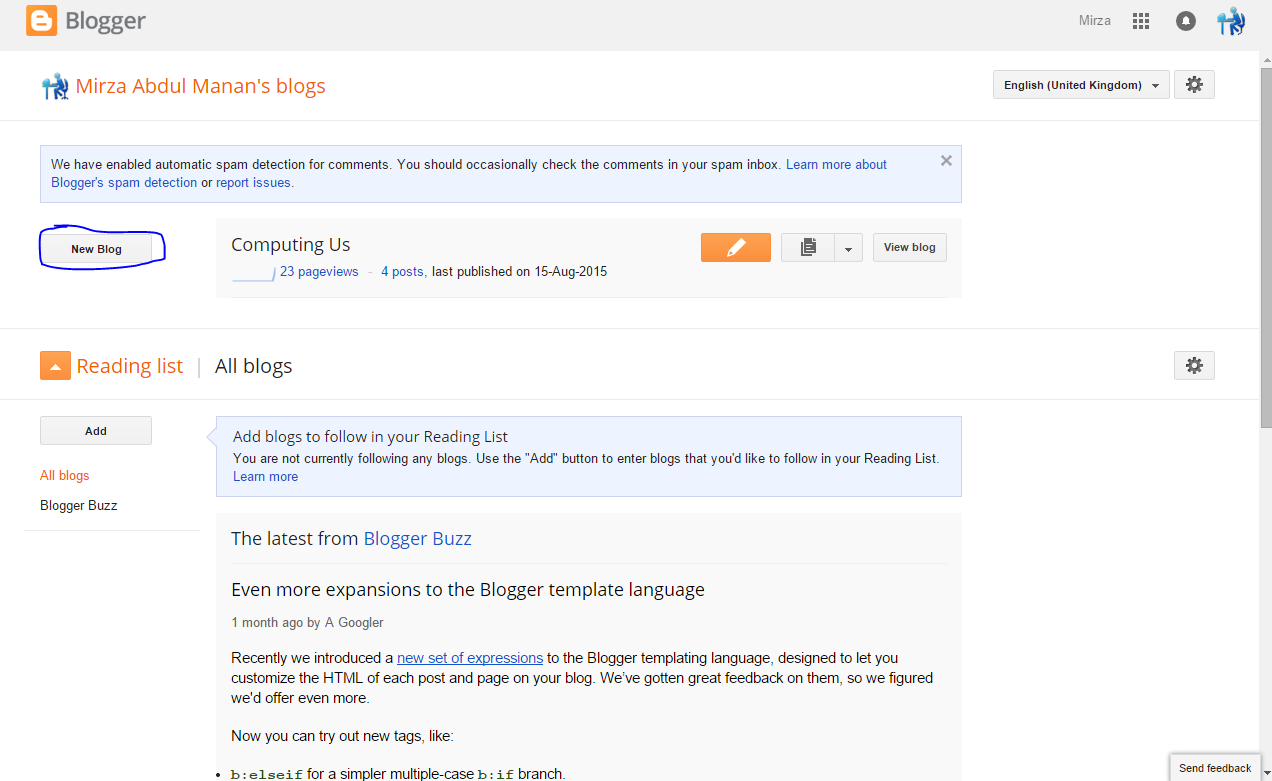
How to create a Blogger blog
Blogger is a blog-publishing service that allows multi-user blogs with time-stamped entries. It was developed by Pyra Labs, which was bought by Google in 2003. Generally, the blogs are hosted by Google at a subdomain of blogspot.com
- You are login to your blogger account using Google ID.
- After this Click on New Blog.
- You show a box. Enter Blog title And enter blog adders. And choice a blog template you like.
- After all of this step click on create.
- Job done alright if you want to delete any blog to visit this Tutorial
How to delete Blogger blog
Blogger is a blog-publishing service that allows multi-user blogs with time-stamped entries. It was developed by Pyra Labs, which was bought by Google in 2003. Generally, the blogs are hosted by Google at a subdomain of blogspot.com
First you can create a blog on blogger after this if you want to delete the blog and you don't know how to delete the blog on blogger you can follow this simple step to delete the blogger blog.
Follow Me
- You are login to your blogger account using Google ID.
- After this you choice the blog you want to delete.
- After Choiceing the blog click on more icon. And click on Settings
- Click on other button.
- Click on Delete Blog.
- Confirm you delelte if you want to realy delete the blog to click on Delete this blog.
Thursday, 25 December 2014
How to register IDM
Today i am show to how to internet download manager solve problem video lecture. Complete method to how to solve idm problem Urdu and Hindi video tutorials we are going to tell. Many site show how to solve idm problem Urdu video tutorials provided. Internet And Computer Help decided. Create a best video to solve the idm all problems. We the people how to solve internet download manager problem Urdu video tutorials provided. Internet And Computer Help at this video training in addition to how to solve idm problem Urdu and Hindi video tutorial.
Saturday, 6 September 2014
Sunday, 15 June 2014
Sunday, 5 January 2014
Compiler For C++
C++ is a best language for programming. It is vaery simple and easy to learn. For starting learning C++ you must have to install compiler which compile your source code.
There are many compiler which is different in function and its looking.
Here I posted some compiler which is mostly use.
There are many compiler which is different in function and its looking.
Here I posted some compiler which is mostly use.
- Deve C++
- Boorland C++
- Turbu C++
Feature of Deve C++:
Support GCC-based compilers
Integrated debugging (using GDB)
Project Manager
Customizable syntax highlighting editor
Class Browser
Code Completion
Function listing
Profiling support
Quickly create Windows, console, static libraries and DLLs
Support of templates for creating your own project types
Makefile creation
Edit and compile Resource files
Tool Manager
Print support
Find and replace facilities
CVS support
Click here for downloading.
Other details will publissehed soon.
Tuesday, 31 December 2013
Activater for window 8.1,window 7,window vista,window server, M.S Office 2013, M.S Office 2010
Important Note :- If you have Window 8.1,Window 7,Window vista,Window server, M.S Office 2013, M.S Office 2010 and you want to activate it legally than you can use this software. But it is recommend you to activate that software from its creater.
KMSpico v9.1.20131210 RC Install Edition
System requriment:-
2. Install it.
2.1 For W8.1 Accept Install the Tap Network driver.
3. Done.
How This Program Works:-
1. Install KMSpico in Windows.
1.1 Create Shortcuts for KMSpico
1.2 In W8.1 Install the Tap Network Driver.
2. Run automatically KMSELDI.
2.1 Make Tokens Backup.
2.2 Detect VL or Retail and depending of the License Status activate or convert to VL.
2.3 Activate for 180 days all VL products found.
3. Install a windows service that reactive every windows start.
4. Create a task schedule for AutoPico to run every 24 hours.
Do note that the usage of these cracks are legal in most
countries outside the United States, IF and ONLY IF you own a
full copy of the program - then you may use these cracks
for backup purposes, and only that. It remains to be seen how
affected you are of the End User License Agreements (EULAs).
They can't supersede domestic laws, remember that.
KMSpico v9.1.20131210 RC Install Edition
System requriment:-
.NET 4.0 or Windows 8/8.1/2012/R2.
Activate: Windows Vista Business/N/Enterprise/N
Windows 7 Professional/N/Enterprise/N
Windows 8 All
Windows 8.1 All
Office 2010/2013
Windows Server 2008/Standard/Datacenter/Enterprise/2008R2/
Standard/Datacenter/Enterprise/
Windows Server 2012/Standard/Datacenter/2012R2/
Standard/Datacenter
Installation:-
1. Run KMSpico_setup.exe2. Install it.
2.1 For W8.1 Accept Install the Tap Network driver.
3. Done.
How This Program Works:-
1. Install KMSpico in Windows.
1.1 Create Shortcuts for KMSpico
1.2 In W8.1 Install the Tap Network Driver.
2. Run automatically KMSELDI.
2.1 Make Tokens Backup.
2.2 Detect VL or Retail and depending of the License Status activate or convert to VL.
2.3 Activate for 180 days all VL products found.
3. Install a windows service that reactive every windows start.
4. Create a task schedule for AutoPico to run every 24 hours.
Do note that the usage of these cracks are legal in most
countries outside the United States, IF and ONLY IF you own a
full copy of the program - then you may use these cracks
for backup purposes, and only that. It remains to be seen how
affected you are of the End User License Agreements (EULAs).
They can't supersede domestic laws, remember that.
Download link are given bellow.
Sunday, 29 December 2013
Make Your Facebook beautiful With Beautify Facebook
"Make Your Facebook beautiful With Beautify Facebook "
Beautify Facebook is a Chrome extension that lets you tweak and change the way Facebook appears in your browser. It is a must have extension. Must try if you are a Facebook user.
Feature Of Beautify Facebook
Beautify Facebook is a Chrome extension that lets you tweak and change the way Facebook appears in your browser. It is a must have extension. Must try if you are a Facebook user.
Feature Of Beautify Facebook
- The add-on lets you add a custom background image to Facebook to hide the traditional white background.
- Rounds off the corners of chat boxes and sidebars.
- Adds emoticons to Facebook chat, and provides transparency settings so you can tweak the look of your news feed or the sidebars to fade into the background.
- Makes Sidebars on both the sides fixed , so that you can scroll down without leaving the sidebars. This is the most amazing feature of Beautify Facebook.
- These were just some of the features of Beautify Facebook. It has much more than this for you.
Friday, 20 December 2013
How to make windows 7 genuine??
Window 7 is most popular operating system designed by Microsoft windows. However window 8 has many new feature and design but window 7 is popular as past.
You have experienced the warning such as "This copy of window is not genuine". Today by a simple trick I learn you how to make your window genuine? You have only need to access "cmd".
1. Click on start , search for 'cmd' .
2. Open 'cmd' with administrator privileges. For this just right click on 'cmd' and click on 'Run as Administrator'
3. Type that words "slmgr-rearm" and hit enter.
4. Now a message display that you window in now genuine.
You have experienced the warning such as "This copy of window is not genuine". Today by a simple trick I learn you how to make your window genuine? You have only need to access "cmd".
1. Click on start , search for 'cmd' .
2. Open 'cmd' with administrator privileges. For this just right click on 'cmd' and click on 'Run as Administrator'
3. Type that words "slmgr-rearm" and hit enter.
4. Now a message display that you window in now genuine.
Thursday, 19 December 2013
Keyboard short cut keys for Microsoft window
Keyboard Shorcuts (Microsoft Windows)
****************************************************************1. CTRL+C (Copy)
2. CTRL+X (Cut)
3. CTRL+V (Paste)
4. CTRL+Z (Undo)
5. DELETE (Delete)
6. SHIFT+DELETE (Delete the selected item permanently without placing the item in the Recycle Bin)
7. CTRL while dragging an item (Copy the selected item)
8. CTRL+SHIFT while dragging an item (Create a shortcut to the selected item)
9. F2 key (Rename the selected item)
10. CTRL+RIGHT ARROW (Move the insertion point to the beginning of the next word)
11. CTRL+LEFT ARROW (Move the insertion point to the beginning of the previous word)
12. CTRL+DOWN ARROW (Move the insertion point to the beginning of the next paragraph)
13. CTRL+UP ARROW (Move the insertion point to the beginning of the previous paragraph)
14. CTRL+SHIFT with any of the arrow keys (Highlight a block of text)
15. CTRL+A (Select all)
16. F3 key (Search for a file or a folder)
17. ALT+ENTER (View the properties for the selected item)
18. ALT+F4 (Close the active item, or quit the active program)
19. ALT+ENTER (Display the properties of the selected object)
20. ALT+SPACEBAR (Open the shortcut menu for the active window)
21. CTRL+F4 (Close the active document in programs that enable you to
have multiple documents opensimultaneou sly)
22. ALT+TAB (Switch between the open items)
23. ALT+ESC (Cycle through items in the order that they had been opened)
24. F6 key (Cycle through the screen elements in a window or on the desktop)
25. F4 key (Display the Address bar list in My Computer or Windows Explorer)
26. SHIFT+F10 (Display the shortcut menu for the selected item)
27. ALT+SPACE BAR (Display the System menu for the active window)
28. CTRL+ESC (Display the Start menu)
29. ALT+Underlined letter in a menu name (Display the corresponding menu) Underlined letter in a command name on an open menu (Perform the corresponding command)
30. F10 key (Activate the menu bar in the active program)
31. RIGHT ARROW (Open the next menu to the right, or open a sub menu)
32. LEFT ARROW (Open the next menu to the left, or close a sub menu)
33. F5 key (Update the active window)
34. BACKSPACE (View the folder one level back in My Computer or Windows Explorer)
35. ESC (Cancel the current task)
36.SHIFT with any of the arrow keys (Select more than one item in a window or on the desktop, or select text in a document)
Tuesday, 17 December 2013
ONE software that save all your email account
It is a problem to check all e-mails account with a very short time and give reply to all and remembering all passwords of accounts.For this purpose you have to go all e-mails account and check your inbox that a new email com or not, This is surely a very time consuming .You can done all above work with installing a software which keep all you e-mails account and notify you when a new e-mail will come.
For this purpose you have to give your account name and password. Than this software will notify you by ring a bell, you can also set your favorite song or any tune.
For keep privacy of your emails account you must take a master password for this software which give you privacy.
When you are login than it beep a bell.
See these screen shot for help.
For this purpose you have to give your account name and password. Than this software will notify you by ring a bell, you can also set your favorite song or any tune.
For keep privacy of your emails account you must take a master password for this software which give you privacy.When you are login than it beep a bell.
See these screen shot for help.
Click on download button to download software.
Friday, 13 December 2013
Get Pictures from Office Documents
Mostly pictures are inserted in Word Documents, Excel Sheets and Power Points. These pictures can be a screenshots, Clip art or Charts.The easiest way to get these pictures from documents is to open the document and copy the desired pictures and save by pasting in Microsoft Paint.
This method is useful when you have Microsoft Office. If you don't have Microsoft Office What do do??
Their is an interesting solution of this problem.
Microsoft converted all their documents formats to XML from Office 2007.When we save a file in Office 2007 or all onward visions , actually it is a compressed file. In this compressed file all information about documents, its data and graphics are saved in separate folders.To keep in mind this format, We can get easily graphics from any documents.
1) The first thing we do, is to change the extension of that file into zip extension.
2)After changes the extension , the file look like a zip file.
3) Open this file.
4) You can see , there are many XML files and folders in this file.
5) Select the folder Media. If this folder is not present on the root, search in other folders.In case of word document it is present in Word folder.
6) In this folder all pictures are available that are used in document.
This method is useful when you have Microsoft Office. If you don't have Microsoft Office What do do??
Their is an interesting solution of this problem.
Microsoft converted all their documents formats to XML from Office 2007.When we save a file in Office 2007 or all onward visions , actually it is a compressed file. In this compressed file all information about documents, its data and graphics are saved in separate folders.To keep in mind this format, We can get easily graphics from any documents.
1) The first thing we do, is to change the extension of that file into zip extension.
2)After changes the extension , the file look like a zip file.
3) Open this file.
4) You can see , there are many XML files and folders in this file.
5) Select the folder Media. If this folder is not present on the root, search in other folders.In case of word document it is present in Word folder.
6) In this folder all pictures are available that are used in document.
Thursday, 12 December 2013
Microsoft Mathematics
Overview:-
Microsoft Mathematics is a mathematical tool that provide students that they complete their work easily in pre-algebra, algebra, calculus,trigonometry, physics and chemistry.
With this tool you can work easily but also you can learn about your questions.It also provide step by step procedure.
It include a full-featured graphing calculator that work like a hand-handle calculator.
System requirements:-
Supported Operating Systems: Windows 7, Windows Server 2003 Service Pack 2, Windows Server 2008 R2, Windows Server 2008 Service Pack 2, Windows Vista Service Pack 2, Windows XP Service Pack 3
.NET Framework Microsoft .NET Framework 3.5 SP1
Computer processor 500 MHz Pentium processor or equivalent (minimum); 1 GHz Pentium processor or equivalent (recommended)
Memory 256 MB of RAM (minimum); 512 MB or more (recommended)
Display resolution 800 x 600, 256 colors (minimum); 1024 x 768, 32-bit (recommended)
Video Video card with 64 MB of video RAM
Disk space 65 MB available disk space
Instructions:-
To install this download:
Download one of the files by clicking the Download button next to the appropriate MSetup.exe file (depending on the version you are interested in), and save the file to your hard disk.
Double-click the downloaded program file on your hard disk to start the Setup program.
Follow the instructions on the screen to complete the installation.
Instructions for use:
After you install this application, you can find it among your other programs under the name "Microsoft Mathematics".
To remove this download:
To remove the download file, delete the file MSetup.exe.
On the Start menu, point to Settings and then click Control Panel.
Double-click Add/Remove Programs.
In the list of currently installed programs, select Microsoft Mathematics and then click Remove or Add/Remove. If a dialog box appears, follow the instructions to remove the program.
Click Yes or OK to confirm that you want to remove the program.
Click here for downloading x64.
Click here for downloading x32.
Tuesday, 10 December 2013
Get complete control programs
If you want to get complete control on your computer programs then "Admin app" is best application that give you this feature. Through this you can control all you program. For example if you are work in your office or home with any software and you want that no one use this software without you permission than you have block this program with this software. Now no one use that program without password. i-e you can block any software google chrome, fire fox, CMD, Registry Editor, Skype. This software only run when admin app give permission to it. and this authority is only for you with a password.
App admin is a portable software which have no requirement.
For running first time set a password than after every time it ask password for running.
Click on "+" button to add program which you want to block.
File size 320 KB
Click here for downloading.
App admin is a portable software which have no requirement.
For running first time set a password than after every time it ask password for running.
Click on "+" button to add program which you want to block.
File size 320 KB
Click here for downloading.
Thursday, 5 December 2013
Change Your Window 7 to Window 8.1 In 10 mint
Window 8.1 is published. Every one want to use window 8.1 due to its appearance, good looking, fast booting, new font style, charming applications. But they have a little difficulty there system requirement are not match with the requirement of window 8.1, some want to use window 7 due to filmier with it. So for these computer user I come with a software whit can you easily change your window 7 appearance to window 8.1.
Download Link are given bellow.
Click here for Downloading.
Download Link are given bellow.
Click here for Downloading.
Tuesday, 3 December 2013
Folder Merge
Sometime we cut file and paste them in an other location during transmission of Data.
But there is an easy solution, That is in the form of " Folder Merger".Select folders which we want to merge and click on Merge button.
To download the Folder Merger follow the following link and click on download.
A dialogue box will appear click on Save file.
Then click on the saved file and enjoy this easy solution.
But there is an easy solution, That is in the form of " Folder Merger".Select folders which we want to merge and click on Merge button.
To download the Folder Merger follow the following link and click on download.
A dialogue box will appear click on Save file.
Then click on the saved file and enjoy this easy solution.
Saturday, 30 November 2013
Try Vault to Save Files
Vault is a good software to hide files and folders.
1)Install Software.
2) An icon is created on your Desktop named System Vault.
3)Click on Hide File or Folder to hide files or folders.
4)To Unhide files enter the path of that file and click on Unhide. You cal also set a password.
Sunday, 17 November 2013
Shutdown Programme in Visual Basic
A simple program that will give you the option of Shutdown, Restart and Log Out.
1) Open Visual Basic.
2)Change the name of form as System Control.
3)Make three frames.
4)Give them name as Shutdown, Restart and Log Out.
5) Add three command buttons.
Subscribe to:
Posts (Atom)


.jpg)


.jpg)
.png)
.png)


.jpg)